here is the Best Fitness Apps of This Year
I get it. You open the App Store, type in “fitness app,” and suddenly you’ve got two hundred options promising to turn you into a different person by summer. Half of them want your credit card before you’ve even done one push-up. The other half are just a glorified to-do list with a barbell icon slapped on it.

⚡ AS FEATURED IN GQ, MEN’S HEALTH & BUSINESS INSIDER
The Secret AI Workout Tracker That Actually Learns How You Move
No generic routines. No guessing games. Just a coach-built system that auto-adjusts to your equipment, goals, and schedule in seconds.
Calculate My Personal Plan ➔Takes less than 60 seconds • Start Your Risk-Free Trial
Here’s the truth nobody tells you: most of these apps aren’t bad, they’re just not built for you. The app your gym buddy swears by might be the wrong tool for someone who’s never touched a barbell. The one your cousin uses to train for her marathon isn’t going to help you build muscle. That mismatch is why so many people download an app, use it for eleven days, and quietly let it die on page three of their phone.
I spent real time in four of the apps that keep showing up at the top of every “best fitness app” list right now, and I dug through what actual users — not press releases — are saying about them on Reddit and review sites. No hallucinated specs, no “trust me bro.” Just what’s actually true about each one, who it’s genuinely good for, and who should walk right past it.
By the end of this, you’ll know exactly which one matches where you’re at — whether that’s a guy who wants an AI to build his workouts for him, someone who just wants a clean notebook for the gym, a runner who lives for Sunday long runs, or someone who wants an actual human checking in on them every week.
Table of Contents
Let’s get into it.
The 4 Best Fitness Apps Right Now (And Who Each One Is Actually For)
Before I break each one down, here’s the quick version. I picked these four because they’re not chasing the same lane — each one solves a different problem, and together they cover almost anyone reading this.
- Fitbod – best if you want an AI to build your workout for you, no thinking required
- Hevy – best free app for just logging your lifts, clean and simple
- Strava – best for runners, cyclists, and anyone who lives outdoors
- Caliber – best if you want a real human coach checking your form and your progress
1. Fitbod — The AI Personal Trainer In Your Pocket

If you’ve ever stood in the gym staring at the rack thinking “okay… what now,” Fitbod is built for exactly that moment.
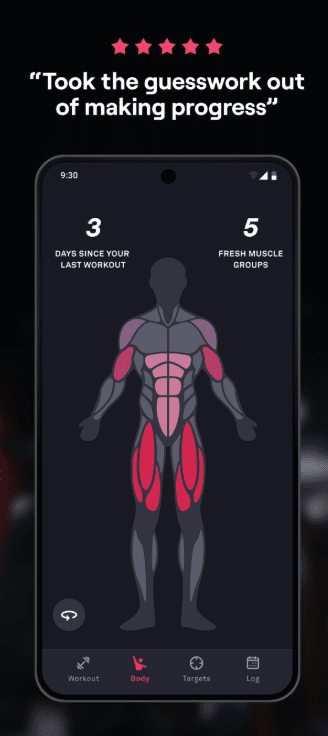
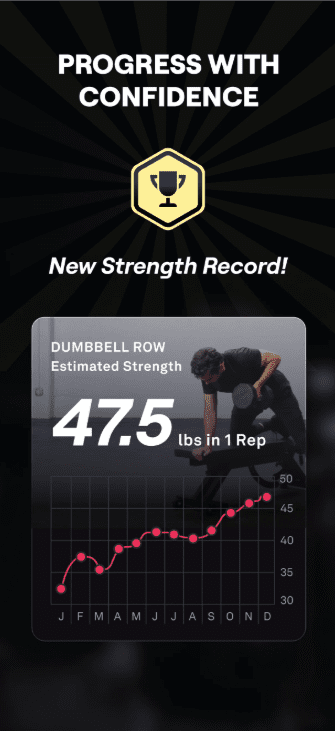
What it actually does: You tell it your goal, your experience level, and what equipment you’ve got access to — whether that’s a full commercial gym or just a pair of dumbbells in your garage. From there, Fitbod builds your workout for you. The smart part is that it remembers what you trained last time and how your muscles are likely recovered, so it won’t hand you another brutal leg day the morning after you already destroyed your legs. It adjusts as you go instead of giving everyone the same cookie-cutter plan.
What real users are saying: Going through long-term reviews on Trustpilot and fitness forums, a pattern shows up over and over: people who stick with Fitbod for a year or more rate it almost universally high and describe it as the thing that finally made them consistent. New or short-term users tend to be more mixed, mostly because the algorithm starts off feeling a little generic before it has enough workout history to actually personalize things. That tracks with how AI-driven anything works — it needs data before it gets smart.
The other thing that comes up a lot: if you subscribed through the Apple App Store, Fitbod has limited ability to handle your refund or billing directly, since Apple controls that side. So if you’re going to commit, subscribing through Fitbod’s own website instead of through your phone’s app store will save you a headache later if you ever need to cancel or get help.
Pros:
- Genuinely smart about working around your soreness and recovery, not just repeating a template
- Works whether you’re in a full gym or training at home with minimal kit
- Massive exercise database, so you’re not doing the same five movements on repeat
- Saves real mental energy — you stop having to “program” your own training
Cons:
- The free trial only gives you three workouts, which honestly isn’t enough to see the algorithm actually personalize anything — it usually takes 10 to 15 sessions before it really learns your patterns
- If you’re an advanced lifter following a specific method, like a powerlifting peaking block or a very structured hypertrophy specialization phase, the general AI programming is good but not built around your exact methodology
- Doesn’t include some of the finer exercise variations serious lifters look for, like specific grip widths or tempo work
- It’s a subscription app — no meaningful free version once your trial workouts are used
Who it’s best for: Anyone who wants to walk into the gym, open an app, and just be told what to do — no spreadsheet, no Googling “best chest exercises,” no decision fatigue. Perfect for beginners and intermediates. If you’re a competitive powerlifter following a very specific peaking program, you might find this one a bit too general for your needs.
2. Hevy — The Free App That Actually Stays Free

🏆 TOP-RATED CUSTOM HOME FITNESS & DIETARY BLUEPRINT
The Smart Home Workout Planner That Auto-Adjusts To Your Goals
No gym required. Skip the generic routines with an adaptive plan, step-by-step guidance, motivational tips, and structured dietary support built for you.
Build My Custom Home Plan ➔Trusted By Millions Globally • Start Your Risk-Free Trial Today
This one’s for the person who just wants somewhere clean to write down what they lifted. No AI, no flashy gimmicks — just a really well-built digital notebook.
What it actually does: You log your sets, reps, and weight, and Hevy shows you exactly what you did last time so you can try to beat it next session. That’s progressive overload made simple — you can’t improve what you’re not tracking, and Hevy makes the tracking part painless. It also has a social side where you can follow training partners and see what they’re lifting, which turns out to be a bigger deal for consistency than people expect.
What real users are saying: The thing that comes up again and again across r/fitness and app comparisons is just how complete the free version actually is. Most logging apps dangle a “free” tier that’s really just a 7-day trial in disguise. Hevy’s isn’t. The honest limitation is that the free plan caps you at a small number of routines and a few months of history — once you’re running more than a handful of training splits or want to look back further, that’s when people upgrade.
There’s also a clear difference in philosophy worth knowing before you download it: Hevy is a logger, not a coach. It will show you exactly what you did. It will not tell you what to do next or adjust your plan based on how tired you are. If you want that kind of guidance, that’s where Fitbod (or pairing Hevy with a coaching app) comes in.
Pros:
- The free tier is a real, usable product — not just a teaser
- Fast logging — built for actually using mid-set, not fiddling with menus
- Strong social/community layer if you like training with accountability from friends
- Cross-platform and treats Android just as well as iPhone, which a lot of fitness apps don’t

Cons:
- No AI — it won’t build your workout or adjust based on recovery
- Free plan limits you on number of routines and how far back your history goes
- Exercise library and demo videos are smaller than dedicated tracking apps like Jefit
- If you want deep training-methodology support (specific bodybuilding splits, RIR/RPE auto-calculations), it’s not built in
Who it’s best for: Lifters who already know what they’re doing and just want the fastest, cleanest way to record it — plus anyone who’s more likely to stay consistent with a bit of social accountability. If you need the app to tell you what to lift, this one isn’t it.
3. Strava — The One Every Runner and Cyclist Already Has

If your fitness world is roads, trails, or pavement instead of a weight rack, this is the app that’s basically become the default.
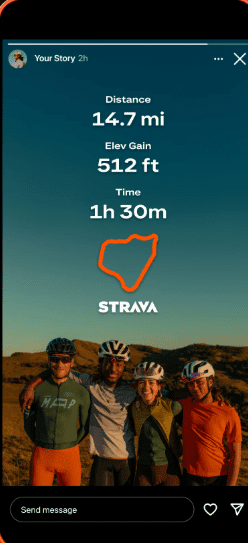
What it actually does: Strava tracks your runs, rides, swims, and just about anything else with GPS, then turns that data into a social feed where you can see your friends’ activities, compete on specific stretches of road called “Segments,” and get kudos for getting out there. It’s less a fitness tracker and more a social network built entirely around training.
What real users are saying: The honest consensus from long-term users is that the free version is still genuinely solid — you get GPS tracking, the activity feed, basic stats, and segment viewing. Where it gets people is the steady creep of features moving behind the paywall over the years.
Group Challenges, full leaderboards, training load metrics, and offline maps now live behind Strava’s subscription. One runner who tracked her own 90-day trial of premium summed it up well: the social and recording side is excellent, but Strava is “not great at telling you what to do next” — its training plans are static PDFs rather than something that actually adapts to your performance.
As of mid-2026, a Strava subscription runs $11.99 a month or $79.99 a year in the US (UK pricing sits around £8.99/month or £54.99/year). Worth knowing too: there’s no family plan — every person needs their own individual subscription, so don’t expect to split the cost with a training partner.
Pros:
- The free version is one of the better “free” tiers in fitness apps, not a bait-and-switch
- Massive community — segments and kudos are weirdly motivating for sticking with a running or cycling habit
- Syncs with basically every watch and tracker on the market
- Genuinely the best option if community and competition motivate you more than raw numbers
Cons:
- A lot of the genuinely useful analytics (Fitness & Freshness, performance predictions, full leaderboards) require the paid tier
- Your location and activity data is public by default, which some people aren’t comfortable with — you’ll want to dig into the privacy settings
- It records what you did, but it doesn’t build you a smart, adapting training plan the way a dedicated coaching app does
- Subscription price has been creeping up over the past couple years
Who it’s best for: Runners, cyclists, hikers, and swimmers who want to log outdoor activity and stay motivated through community and competition. If you’re purely a gym lifter, this isn’t your app — go with Fitbod or Hevy instead.
4. Caliber — When You Want an Actual Human Watching Your Progress

This is the one for people who’ve tried the self-guided apps and know, deep down, that they need someone checking in on them.
What it actually does: Caliber pairs you with a real, certified coach who builds and adjusts your training plan based on your actual logged workouts. You message them through the app, they review your numbers, and your plan evolves around your real progress — not a generic algorithm guessing at it.
The training philosophy itself leans heavily on a simple idea: lift the same core exercises consistently, and add a little weight or a rep most weeks, rather than constantly chasing variety for variety’s sake.
What real users are saying: The Trustpilot reviews for Caliber read differently than most fitness apps — they read like people talking about an actual relationship with their coach, not a piece of software.
Multiple long-term users specifically credit their coach by name for helping them understand macros, push through plateaus, or simply stay accountable during busy or stressful stretches of life. That human element is clearly the whole point of the product, and it shows in how people talk about it.
The other side of that coin is cost. Caliber offers a genuinely free, full-featured self-guided tier with access to its full exercise library if you don’t want a coach at all. But the actual personal coaching tier — the reason most people are looking at Caliber in the first place — runs around $200 a month, putting it in the same range as competitors like Future. There’s also a Pro group-coaching tier around $19/month if you want coach access without the full 1-on-1 price tag. One reviewer who tested it for three weeks put it plainly: a $200 monthly charge isn’t feasible for every budget, so make sure you can comfortably afford it before signing up.
Pros:
- Real human coach who adjusts your plan based on what you actually did, not just an algorithm’s best guess
- Strong, well-supported training philosophy built on consistency over chasing novelty
- Genuinely free self-guided tier if you’re not ready to pay for coaching
- 30-day refund window if 1-on-1 coaching turns out not to be for you
Cons:
- The 1-on-1 coaching tier is genuinely expensive compared to almost every other app on this list
- Coach feedback comes through messaging, not live or real-time — so it’s not the same as standing next to a trainer
- Smaller exercise library than dedicated tracking-only apps
- Your experience depends a fair bit on which coach you’re matched with
Who it’s best for: Anyone who’s tried the “figure it out yourself with an app” route and knows they need real accountability and a real person adjusting things based on their life — travel, stress, injuries, all of it. If budget is tight, skip the coaching tier and stick with the free self-guided version, or look at Fitbod instead.

How To Actually Pick the Right One For You
Here’s where I want to save you some money and some wasted weeks. The “best” fitness app isn’t a universal answer — it depends entirely on three things: what you’re training for, how much hand-holding you actually want, and what you’re realistically willing to pay every month.
Start with your actual goal, not the app’s marketing. If your goal is building muscle or getting stronger in a gym, you want Fitbod or Hevy. If your goal is running your first 10K or just getting outside more, Strava is going to serve you better than any lifting app ever could. Don’t pick an app because it’s popular — pick it because it solves the actual problem you have right now.
Be honest about how much you want to be told what to do. Some people genuinely want zero decisions — open the app, do exactly what it says, done. That’s Fitbod’s whole strength. Other people already know their program and just want somewhere fast and clean to write it down — that’s Hevy. And some people need a real human in the loop who notices when their numbers are slipping and asks why. That’s the entire value of Caliber. There’s no wrong answer here, just an honest one.
Try before you commit to annual billing. Every app on this list has some kind of trial or generous free tier. Use it properly. Don’t judge an AI-driven app like Fitbod off three workouts — give it the ten or so sessions it actually needs to start personalizing. And before you pay for a full year upfront anywhere, make sure you’ve used the app enough times in a real week of training to know it fits your actual routine, not just your motivated Sunday-night mood.
Watch where you subscribe from. This one’s small but it matters: subscribing through an app’s own website instead of through the Apple or Google app store generally gives you more direct control if you ever need to cancel or get a refund. A few extra minutes during signup can save you a frustrating phone call later.
Don’t be afraid to stack two apps. This isn’t cheating. A lot of serious lifters log their workouts in Hevy because it’s fast and clean, while also using Strava to track their cardio and runs. There’s no rule that says one app has to do everything — sometimes the smartest setup is the simplest tool for each specific job.
Grid

Popular Fitness Trackers This Season: here is the best one
Final Verdict: Which One Should You Actually Download Tonight
If I had to boil this whole thing down to one piece of advice, it’s this — stop overthinking the “best” app and start being honest about what kind of support you actually need right now.
If you want an app that builds your workout for you and adapts as you go, Fitbod is the one to start with. If you already know your training and just want a fast, free, well-built place to log it, Hevy is genuinely hard to beat. If your world is running, cycling, or anything outdoors, Strava is still the default for good reason. And if you’ve tried doing it alone before and you know, honestly, that you do better with a real person checking in on you, Caliber is worth the investment if your budget allows it.
None of these apps are magic. They’re tools. The thing that actually changes your body and how you feel is what you do with them, day after day, even on the days you don’t feel like it. Pick the one that removes the most friction for you specifically, download it tonight, and just start. That’s the whole secret — there isn’t a more complicated one hiding underneath it.
Disclaimer: Pricing, free-tier limits, and features mentioned above were accurate as of mid-2026 and are subject to change — always check the app’s current pricing page before subscribing. This article may contain affiliate links, meaning we may earn a small commission if you sign up through them, at no extra cost to you.
We only recommend apps we’d genuinely use ourselves. This content is for general fitness informational purposes and isn’t a substitute for personalized medical or professional training advice — check with a doctor before starting any new exercise program, especially if you have an existing injury or health condition.
Leave a Reply